This document describes new features and major bug fixes added to bhworks in the 25.8 release. This release makes improvements to reports, navigation, and the management of case notes. Smaller bug fixes, performance improvements and infrastructure upgrades are also included in the release but not detailed here.
For more information on new functionality, please contact support@mdlogix.com.
Indicates a feature that may need a request to turn on for your organization.

Release Notes Table of Contents
User Management/Roles
Manage Own Case Notes Role
Automatic Login to bhworks Help Center
Dashboards and Report Improvements
Participants: Episode of Care
Participants: Program Enrollment Report
Screening Activity: SRSS-IE (Early Childhood)
Screening Activity: SRSS-IE (Elementary)
Screening Activity: SRSS-IE (Middle/High)
Screening Activity: CAGE-AID
Case Notes: Billing Review
User Management/Roles
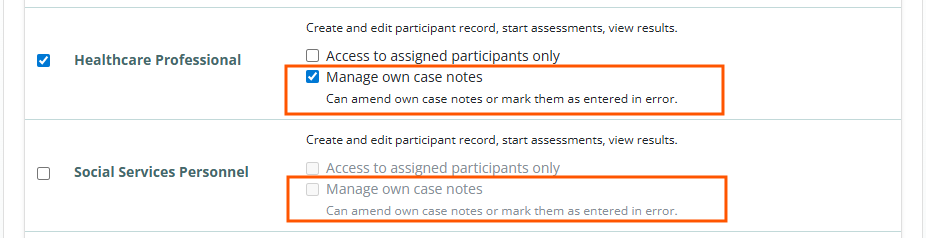
Manage Own Case Notes Role (for Healthcare Professionals & Social Services Personnel)
The Amend Own Case Notes role has been changed to “Manage own case notes.” Users with this role can:
Amend their own case notes (as in the past)
Mark their own case note as “entered in error” (NEW). Note: only case notes in the “Preliminary” or “Preliminary (amended)” status can be marked as entered in error.
Navigation to Help Center
When users click the bhworks Help Center button in the Help popup:
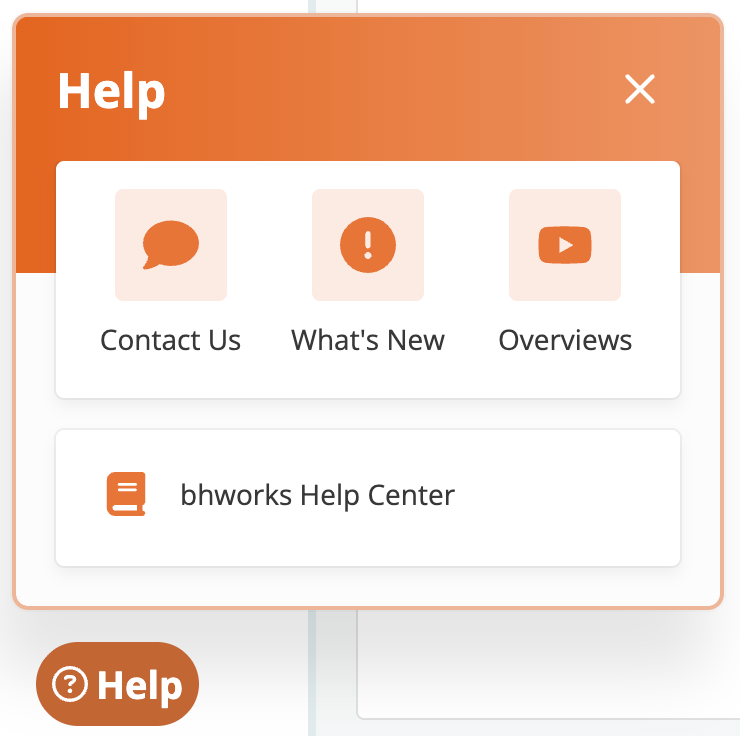
They will automatically be logged into the Help Center to enter new tickets or view previous tickets.

Dashboards and Report Improvements
Participants: Episodes of Care UPDATED
Users can now select “All” in the program dropdown to run the report across all programs.
Participants: Program Enrollment Report UPDATED
Users can now select “All” in the program dropdown to run the report across all programs.
Screening Activity: SRSS-IE (Early Childhood) NEW
Displays de-identified aggregate data on the number of Student Risk Screening Scale - Internalizing and Externalizing Early Childhood (SRSS-IE-EC) screening records. The data includes counts for total screenings as well as a count of unique participants. Graphical breakdowns display the data by month (finalized date), risk level scores, and a breakdown of demographic attributes (Gender, Race, Ethnicity, Age) from the participant’s profile at the time the data was submitted. Filters allow users to drill-down by program, district/organization, school/location, and task name.
Screening Activity: SRSS-IE (Elementary) NEW
Displays de-identified aggregate data on the number of Student Risk Screening Scale - Internalizing and Externalizing Elementary (SRSS-IE-ES) screening records. The data includes counts for total screenings as well as a count of unique participants. Graphical breakdowns display the data by month (finalized date), risk level scores, and a breakdown of demographic attributes (Gender, Race, Ethnicity, Age) from the participant’s profile at the time the data was submitted. Filters allow users to drill-down by program, district/organization, school/location, and task name.
Screening Activity: SRSS-IE (Middle/High) NEW
Displays de-identified aggregate data on the number of Student Risk Screening Scale - Internalizing and Externalizing Middle/High (SRSS-IE-MHS) screening records. The data includes counts for total screenings as well as a count of unique participants. Graphical breakdowns display the data by month (finalized date), risk level scores, and a breakdown of demographic attributes (Gender, Race, Ethnicity, Age) from the participant’s profile at the time the data was submitted. Filters allow users to drill-down by program, district/organization, school/location, and task name.
Screening Activity: CAGE-AID NEW
Displays de-identified aggregate data on the number of CAGE-AID screening records. The data includes counts for total screenings as well as a count of unique participants. Graphical breakdowns display the data by month (finalized date), risk level scores, demographic attributes (Gender, Race, Ethnicity, Age) from the participant’s profile at the time the data was submitted, and a breakdown of each question’s responses. Filters allow users to drill-down by program, district/organization, school/location, and task name.
Case Notes: Billing Review UPDATED
The Case Notes: Billing Review report lists relevant documents for each participant (consent, plan of care, etc) within the reporting time period. Users can now click on the document to view details about the document.
Was this article helpful?
That’s Great!
Thank you for your feedback
Sorry! We couldn't be helpful
Thank you for your feedback
Feedback sent
We appreciate your effort and will try to fix the article