This document describes new features and major bug fixes added to bhworks in the 26.1 release. This release makes improvements to case notes, reports, and adds new permissions for removing task lists and referrals. Smaller bug fixes, performance improvements and infrastructure upgrades are also included in the release but not detailed here.
For more information on new functionality or to request it is turned on for your organization, please contact support@mdlogix.com.
Indicates a feature that may need a request to turn on for your organization.

TABLE OF CONTENTS
Case Notes
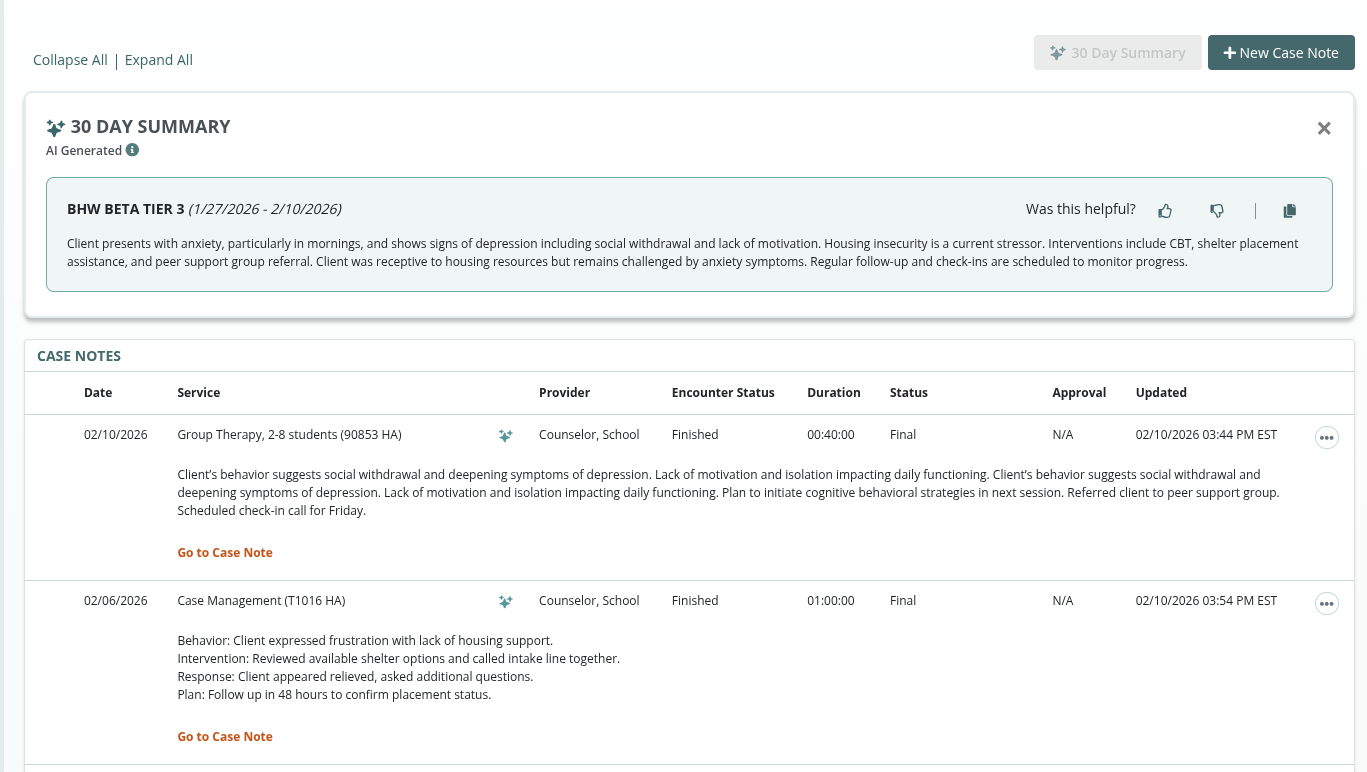
Case Notes Summarization

This feature provides AI-powered summaries of Case Notes to help providers quickly understand a participant’s progress over the 30 days prior to their most recent encounter.
Case Notes for group sessions are included if applicable.
A separate summary will be provided for each program where there is a case note entered within the past 30 days.
Providers can only see summaries for programs to which they are assigned.
Providers can use the Copy Summary function to copy the summary to their clipboard.
Providers can provide feedback on the usefulness of each summary.
Each new or updated case note will be incorporated into a new summary via a nightly process. Providers will be able to view the latest summary the following day.
Updated Reasons to Treat (Z-codes)

New Reasons to Treat are available in the Case Notes module:
F33.0 Major depressive disorder, recurrent, mild
F33.1 Major depressive disorder, recurrent, moderate
F33.2 Major depressive disorder, recurrent severe without psychotic features
Z63.3: Absence of family member
Z63.31: Absences of family member due to military deployment
Z63.8: Other specified problems related to primary support group
Some existing reasons to treat have been updated with more descriptive names from ICD-10. For example, F902 ADHD-Combined is now F902 Attention-deficit hyperactivity disorder, combined type.
Cancelled Services don’t require supervision
For organizations using the Supervision feature, Case Notes for cancelled encounters do not need to be submitted for approval. The provider entering a note for a cancelled encounter can simply finalize the note. These notes will not show up on the supervisor’s report and no longer need to be reviewed.
Tasks
Remove Task List
Users with the Healthcare Professional, Social Services Personnel, and/or Nurse role can now remove a task list from a participant’s record as follows:
Go to the Participant’s Task tab
Click the “3 dot” menu icon (3 dots on the top-right of the task list)
Select Remove, then
Click the OK button to confirm the removal
Note: The option to Remove the task list will only be available if there are no completed tasks in the list.
Users with the Organization Manager role can also remove Task Lists, as before.
Referrals
Remove Referrals
Users with the Organization Manager role can now remove a referral from a participant’s record and the referrals tab as follows:
Go to the desired referral record (on the Referrals tab or the Participant’s Referrals tab)
Click the Edit button
Click the Remove button, then
Click the OK button to confirm the removal
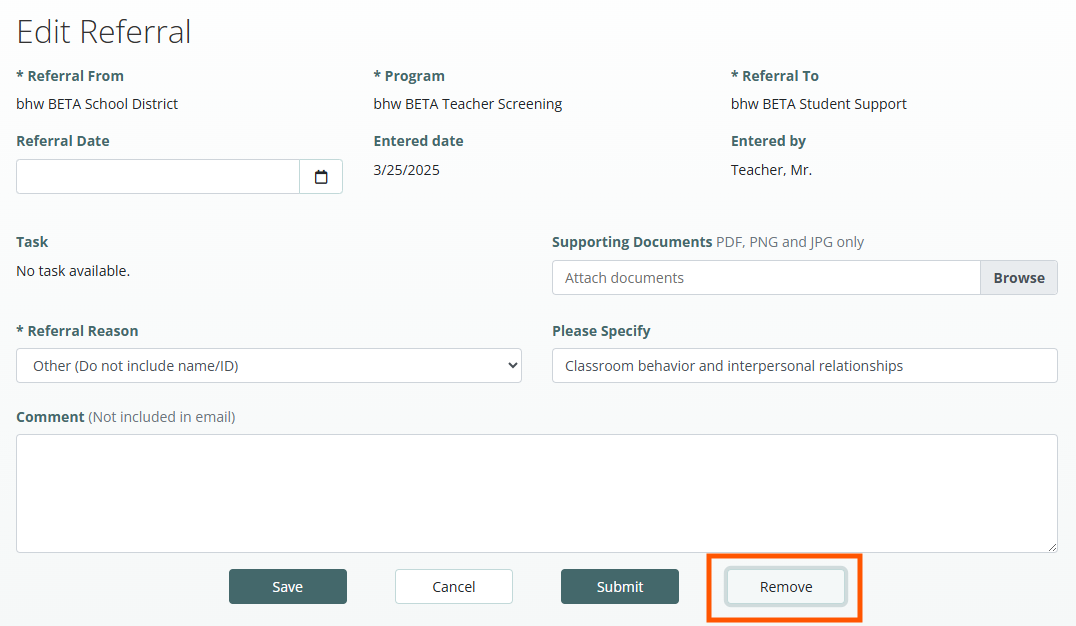
Note: Removing a referral will also remove associated documentation including referral details and consents, whether completed electronically or via document upload. The user will see these listed in the final confirmation step. If you need to maintain any documentation that will be deleted with the referral, please download the report and attach it to another task. Please out to customer support if you need assistance or have further questions.
Dashboards and Reports
Forms: Data Export UPDATED
All Programs Export - Users can now select “All” in the program dropdown to run the forms data report across all programs.
Export Type - Users can now select a Data Export Type when exporting data:
Basic
Data will be exported in a simple format. It will include only the human readable responses (e.g. Yes, No, Maybe) and excludes the coded responses (e.g. 1, 2, 3). There will be a single column for each question, with the exception of Other Specify responses. If the form includes tabular responses, these will be exported in a separate file with the same format. The exported data will also include the participants’ name, demographics and all identifiers.
Advanced
Data will be exported in the traditional format. It will include both human readable responses (e.g. Yes, No, Maybe) and the coded responses (e.g. 1, 2, 3). There may be multiple columns for each question. Users have additional options for selecting how their data should be exported, including: removing empty columns, exporting tabular responses in a separate file, including participant names, demographics, medical record numbers/IDs, and bhworks ID.
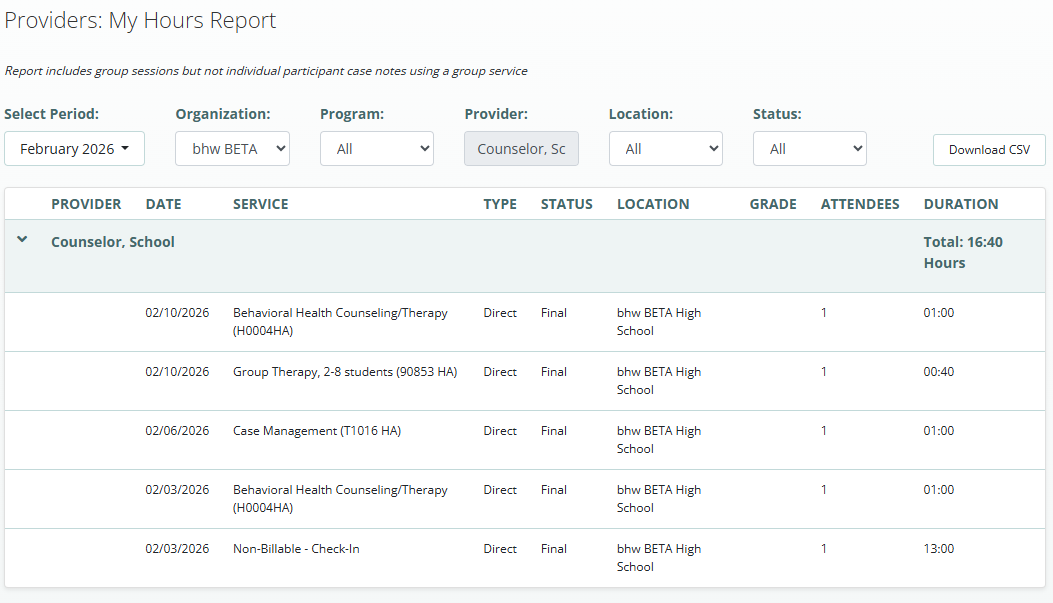
Providers: My Hours Report NEW
Individual providers can run the Providers: My Hours Report to see the amount of time they have logged for direct, indirect, and group services during a selected period of time. The report only shows logs for the provider running the report and does not display information from any other provider. As before, the Providers: Hours Report can be run by a user with the Organization Manager role to view all provider hours within a program.

Was this article helpful?
That’s Great!
Thank you for your feedback
Sorry! We couldn't be helpful
Thank you for your feedback
Feedback sent
We appreciate your effort and will try to fix the article