The Screening Activity: BHS (Adolescent/Adult) dashboard displays de-identified, aggregated, real-time data from all adolescent and/or adult versions of the Behavioral Health Screen.
The forms included are dependent on which versions are assigned to your organization and have at least one completed screen.
The dashboard only displays information about screens that have been finalized and does not include forms that have not been started or are still in progress.
The screening date is based on when the task was completed, not the date the task was originally assigned.
For general information on navigating dashboards, please click this link.
Dropdown/Selectable Filters:
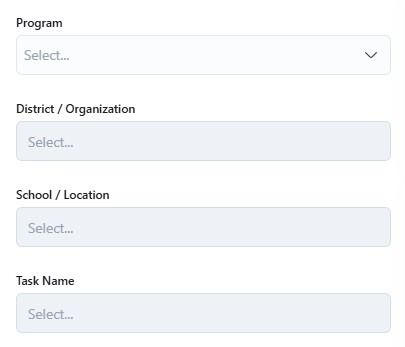
You can use the dropdown/selectable filter options to narrow the dashboard results to only show specific programs, districts/organizations, schools/locations, and/or task name (if there are different versions of the form used). Otherwise, the default view will show all of the forms completed across all participating programs and locations.
Program
District / Organization
School / Location
Task Name (For different versions of the form)
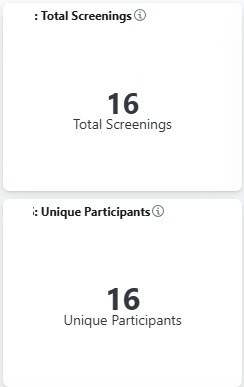
The Screening Activity: BHS (Adolescent/Adult) dashboard is an easy way to pull the following numbers:
Total number of screenings
Total number of unique participants with at least one Behavioral Health Screen completed
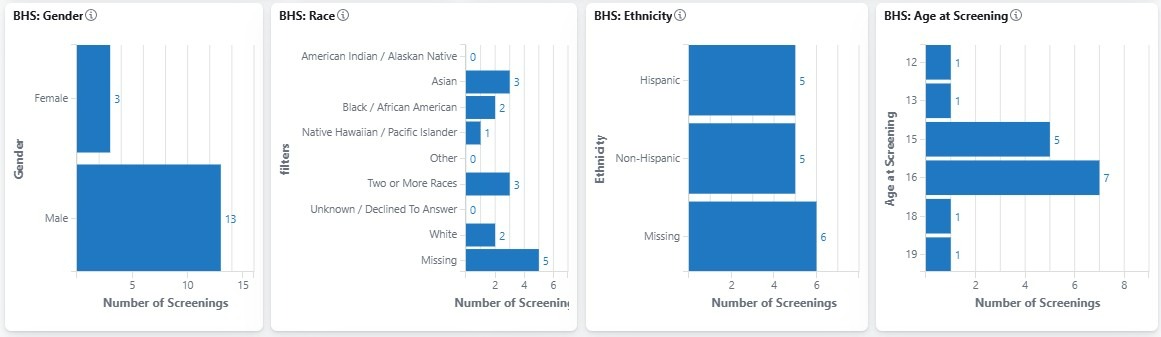
The Screening Activity: BHS (Adolescent/Adult) dashboard also includes the following charts and tables:
Screenings by Month
Demographics of the participants who have at least one screen completed:
Gender
Race
Ethnicity
Age at Screening
At-Risk Scores displays the number of participants that screened positive in the following domains:
Moderate/Severe Depression
Significant Anxiety
At Risk for PTSD
History of Suicide Ideation
At Risk for Suicide (Current)
At Risk for Substance Abuse problem
At Risk for Eating Disorder
Average Scores for Each Domain over Time
Intake
3 Month
6 Month
9 Month
12 Month
Exit
If you do not see data in the Average Scores by Task Name / Time Period visual, please contact Customer Support https://mdlogix.freshdesk.com/support/tickets/new to configure this for your organization.
Additional Domain Specific Information
Domains:
Depression
Anxiety
Trauma
Suicide Lifetime
Suicide Current
Substance Abuse
Eating Disorder
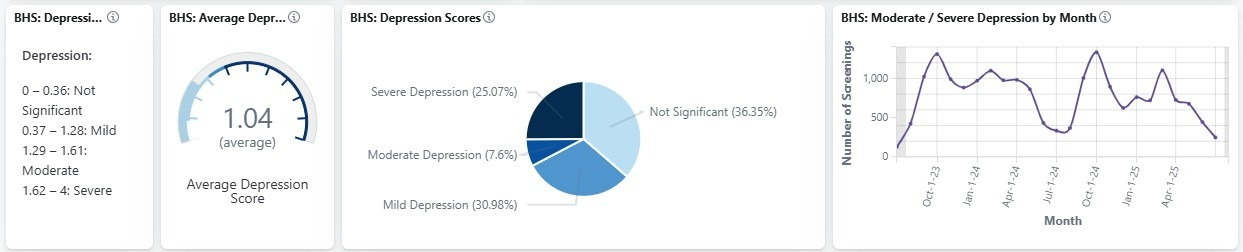
Each key domain assessed within the Behavioral Health Screen is broken down further to include the following information:
Key displaying score thresholds
Average Score
Breakdown of the percent of participants that scored within each significance level
Number of screens that scored for high risk by month
Resetting the Dashboard
To clear individual filters, please click the X next to the filter at the top of the dashboard
To reset the dashboard to its original settings, click the Refresh button on your browser

Download to PDF
Once you have defined the dashboard based on your needs, you can export the entire dashboard as a PDF using the Download to PDF button found on the upper right-hand side.

Was this article helpful?
That’s Great!
Thank you for your feedback
Sorry! We couldn't be helpful
Thank you for your feedback
Feedback sent
We appreciate your effort and will try to fix the article