TABLE OF CONTENTS
- Overview
- Key Benefits
- Creating an Attendance Referral
- Referral Tasks
- Intake Tasks
- Court Document Tasks
- Therapy and Outcome Tasks
- Case Notes
- Participant Referral Overview
- Entering Referral Outcomes
- Episode of Care
- External Referral Tracking
- Reporting and Monitoring
- Customization Options
- Next Steps
Overview
The bhworks Attendance Referral Module helps K-12 schools identify, document, track, and manage students experiencing attendance concerns, chronic absenteeism, truancy, or educational neglect.
This module expands existing student support services by providing a structured workflow for attendance-related referrals, interventions, outcomes tracking, and case management.
Key Benefits
Track attendance-related referrals from initiation through resolution
Monitor referral outcomes and service engagement
Manage attendance intervention plans and documentation
Support truancy and educational neglect processes
Generate individual and population-level reports
Coordinate services across school staff and community partners
Document case management activities and progress monitoring
Creating an Attendance Referral
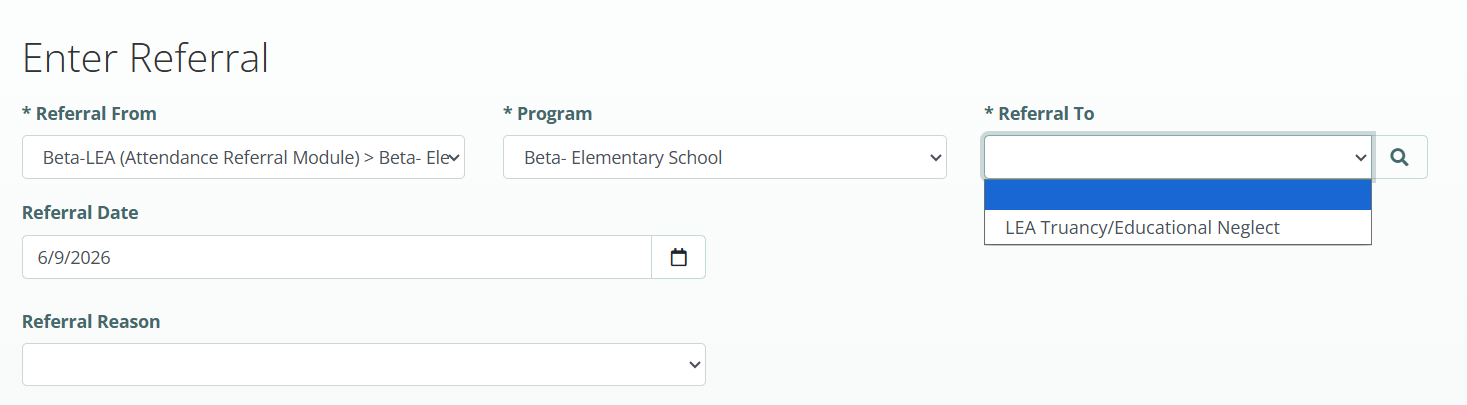
School staff can create an attendance referral using the same referral workflow already available within bhworks.
Steps
Log in to bhworks.
Create a new referral.
Select the appropriate program from the Referral To dropdown.
Complete the referral information.
Assign the referral to the appropriate attendance staff.
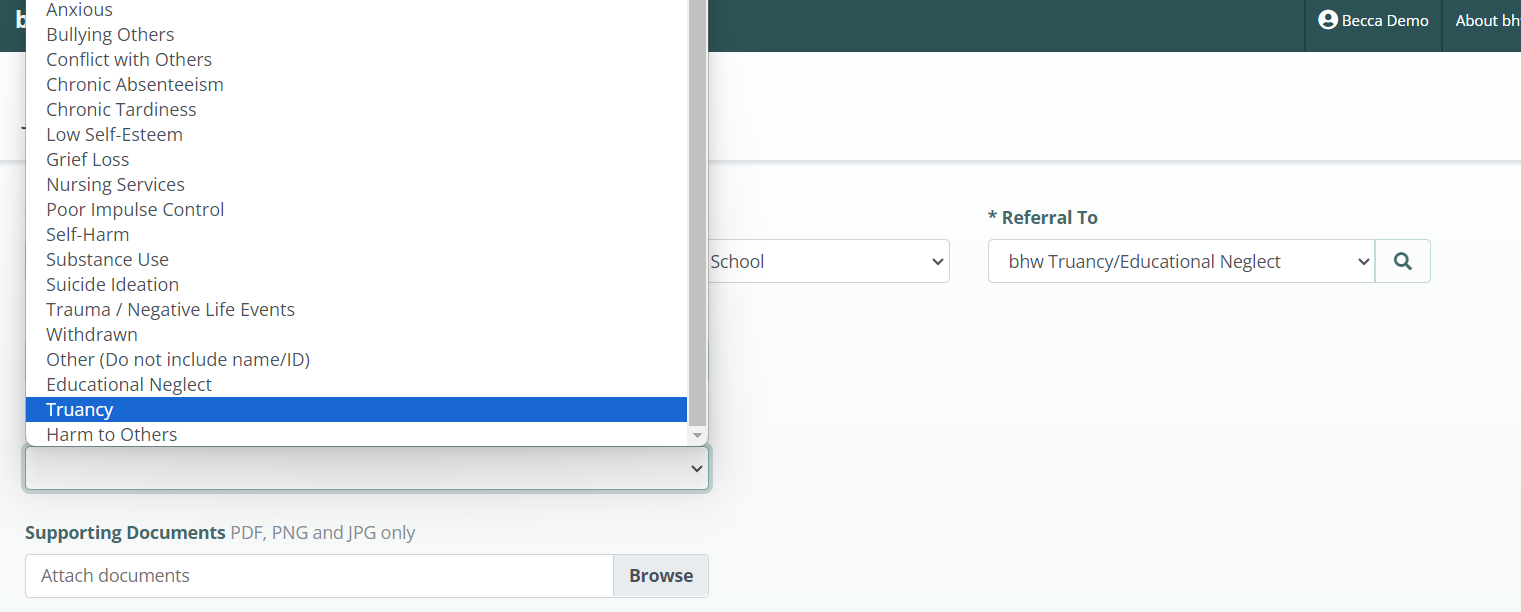
Selecting a Referral Reason
When creating the referral, staff must identify the reason for the attendance concern.
Available Referral Reasons
Truancy
Educational Neglect
General Guidance
Educational Neglect is typically selected for students in Kindergarten through Grade 5
Truancy is typically selected for students in Grades 6 through 12
Referral Tasks
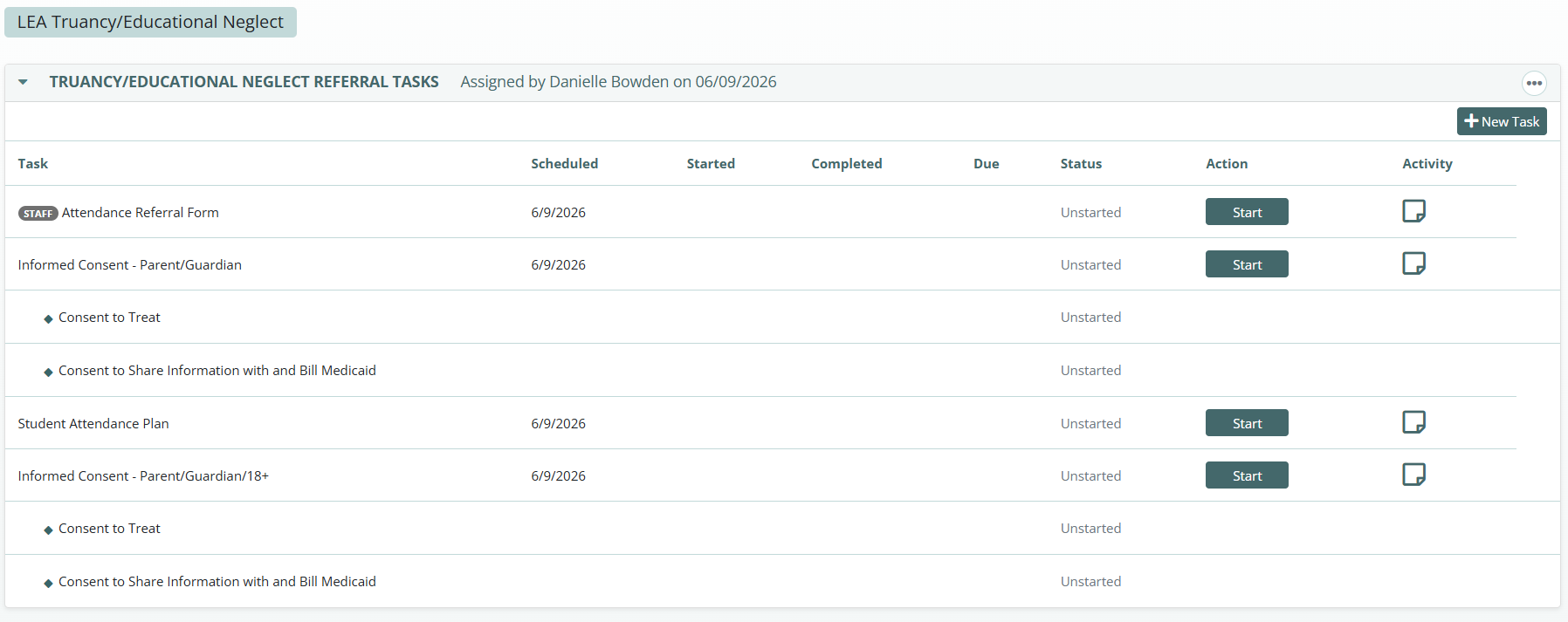
After a referral is created, assigned referral tasks become available for completion.
These tasks collect important information needed to assess attendance concerns and determine appropriate interventions.
Common Referral Tasks
Referral Form
Social Determinants Questionnaire
Brief Attendance Barrier Screening
Attendance Plan
Important Notes
Tasks are fully customizable
Forms can be added, modified, or removed based on district requirements
Existing paper forms may be converted into electronic forms within bhworks
Additional Referral Task Options
Organizations may choose to include additional assessments and forms.
Examples
Attendance Plan
Student Attendance Plan
Barriers to Attendance (Student)
Barriers to Attendance (Parent)
Behavioral Health Screen (Ages 6–14)
Behavioral Health Screen (Ages 12–24)
PHQ-Adolescent Assessment
Discharge Summary
Intake Tasks
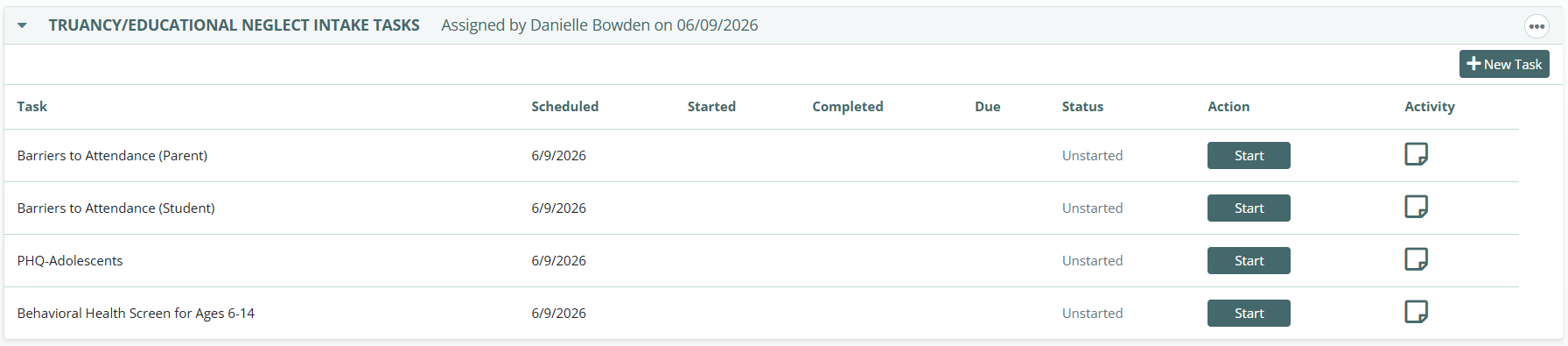
Attendance intake staff can complete intake-specific activities using the Truancy/Educational Neglect Intake Tasks section.
Common Uses
Collect intake information
Review referral documentation
Complete required assessments
Prepare students for service engagement
Court Document Tasks
For students involved in formal truancy or educational neglect proceedings, court-related documentation can be completed within bhworks.
Common Court Documents
Attendance Court Report
Provides updates regarding:
Attendance status
Interventions provided
Progress made
Current case information
Attendance Court Summary
Documents:
Judges
Attorneys
Hearing dates
Court outcomes
Case notes
Court Petition
Upload copies of filed petitions
Maintain court records within the student file

Therapy and Outcome Tasks
This section helps attendance staff document interventions, progress, and referral outcomes.
Attendance Plan
Used to:
Set attendance goals
Define interventions
Document action steps
Track progress
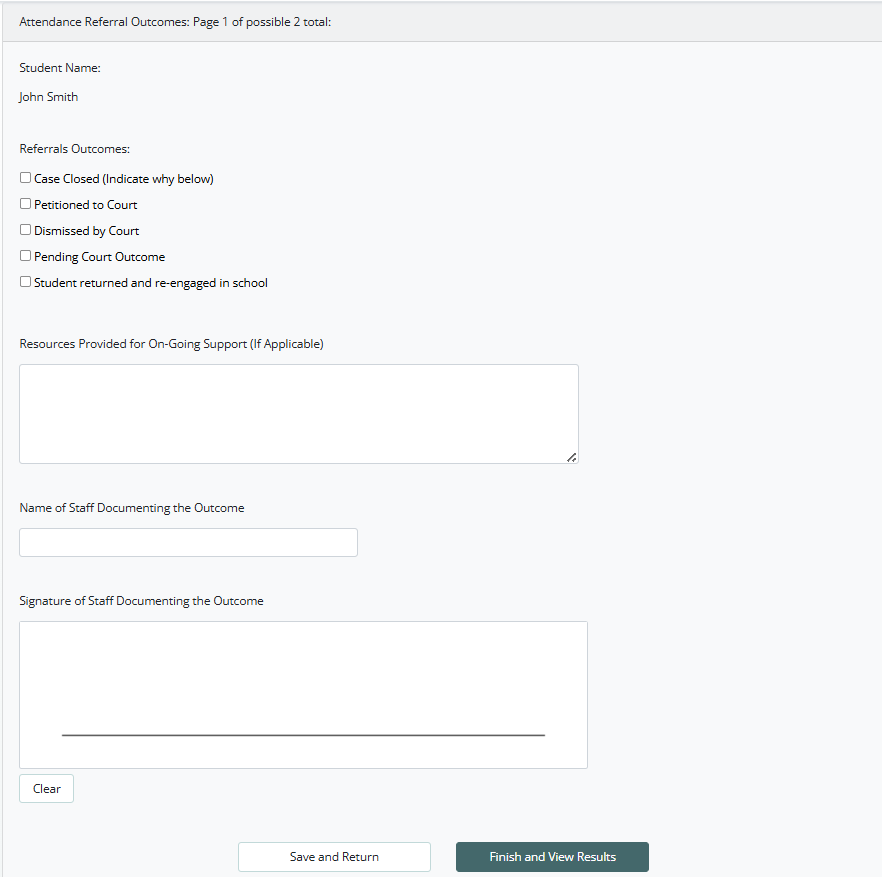
Referral Outcome Form
Used to record final referral outcomes.
Common Outcomes
Case Closed
Monitored by Attendance Officer
Petitioned to Court
Dismissed by Court
Pending Court Outcome
Student Returned and Re-Engaged in School
Optional Outcome Tasks
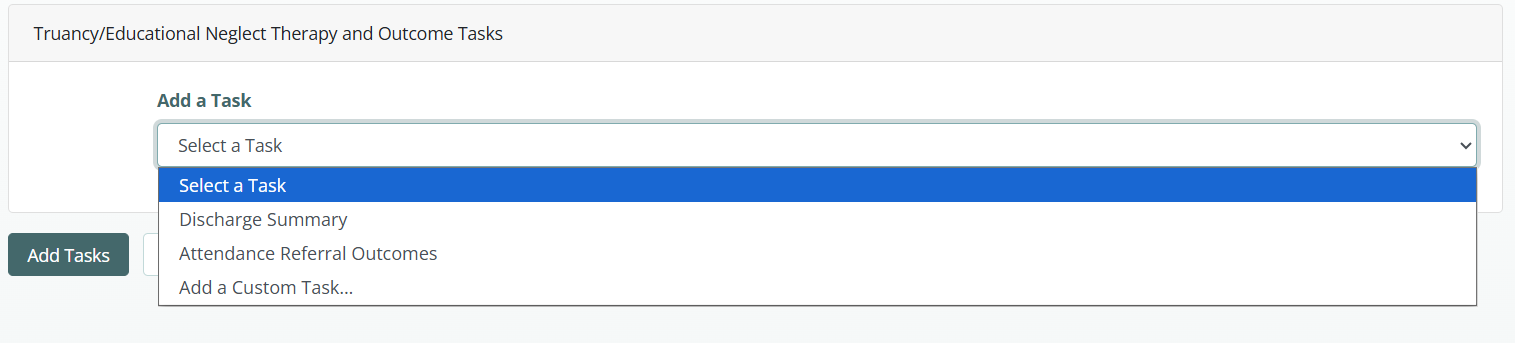
Additional outcome-related tasks can be assigned as needed.
Examples
Discharge Summary
Documents:
Short-term goals achieved
Long-term goals achieved
Resources provided
Ongoing support recommendations
Additional Attendance Referral Outcomes
Allows staff to document multiple outcome updates throughout the case.

Case Notes
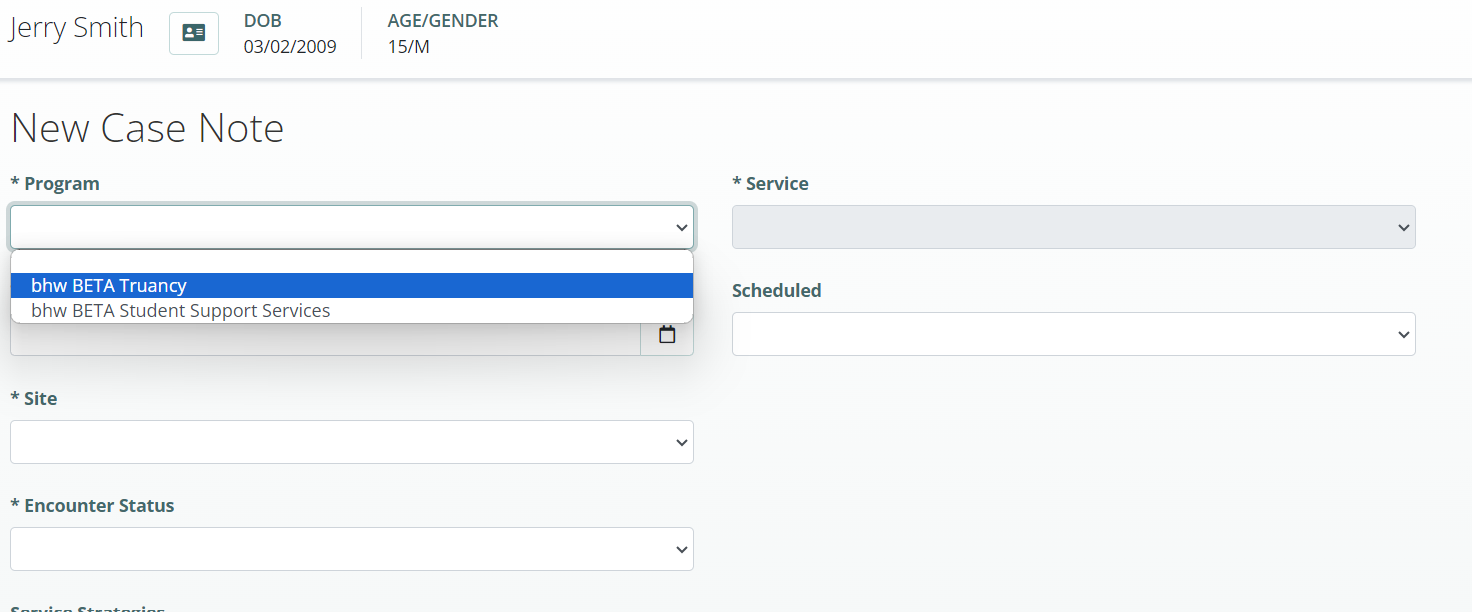
Case Notes allow attendance staff to document services, interactions, and case management activities.
Case Notes Can Include
Parent contacts
Student meetings
Home visits
Care coordination activities
Attendance interventions
Service delivery documentation
Features
Program Selection
Document services across multiple programs.
Service Tracking
Record:
Billable services (when applicable)
Non-billable services
Attendance support activities
Participant Referral Overview
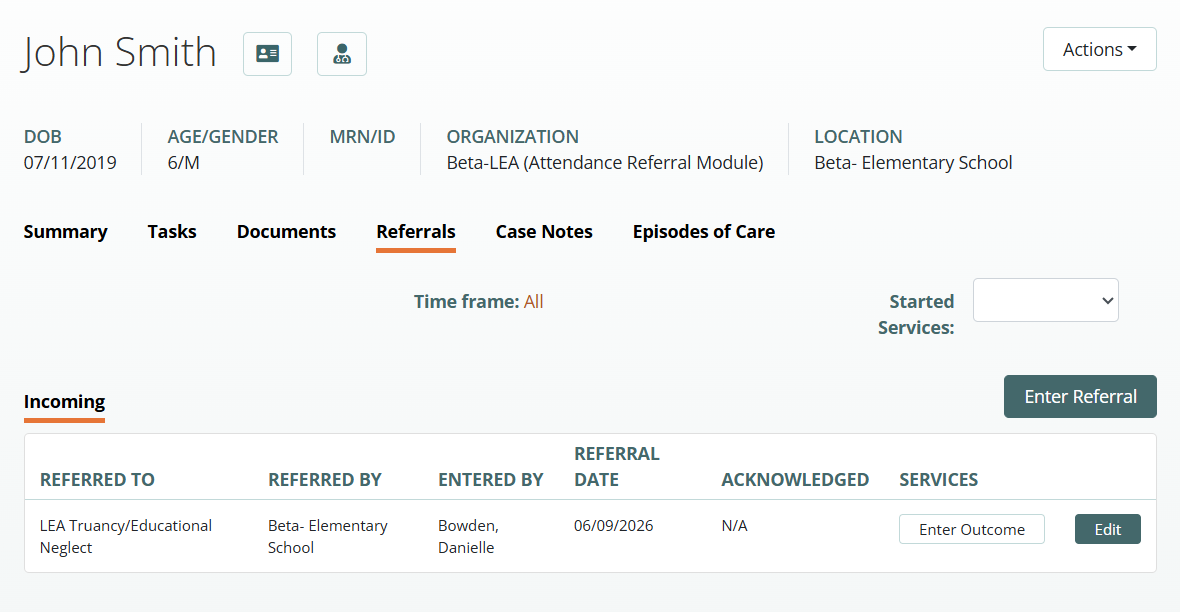
The Incoming Referrals tab provides a complete history of attendance referrals for a student.
Staff Can View
Number of referrals
Referral dates
Program assigned
Referral status
Referral outcomes
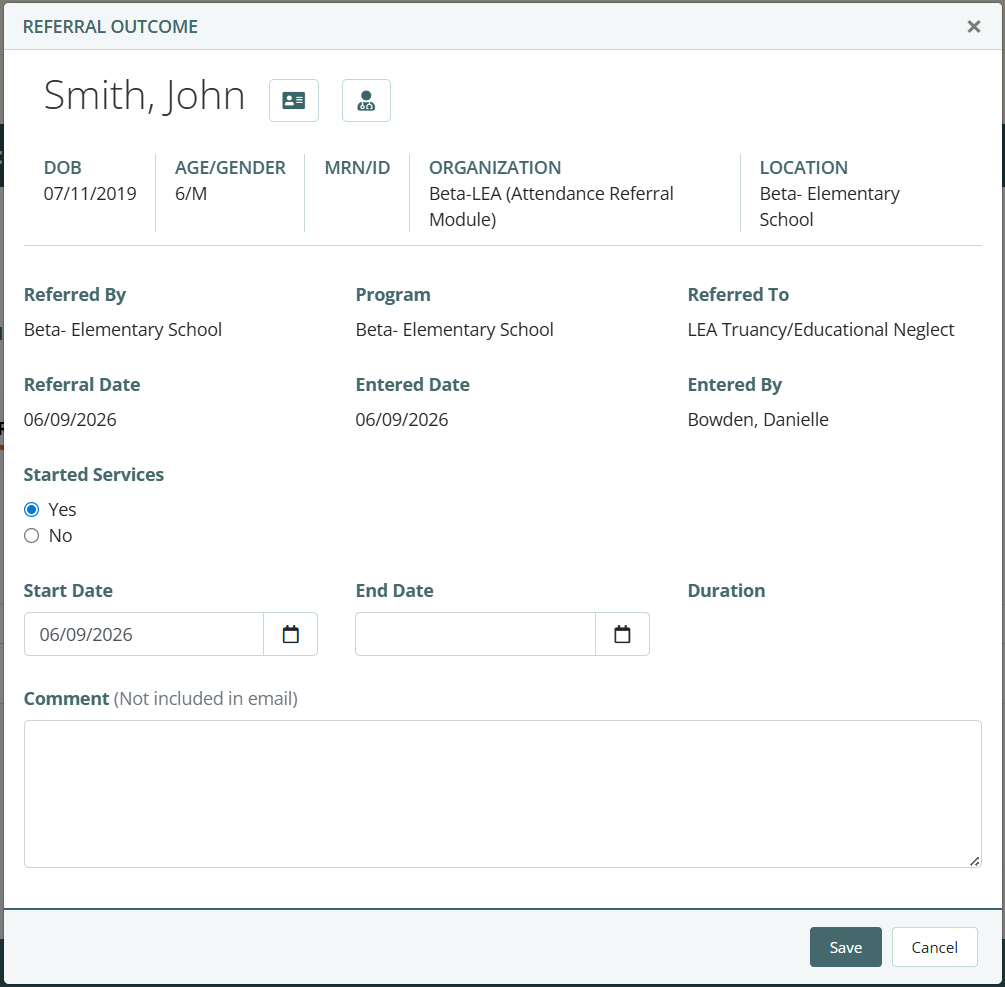
Entering Referral Outcomes
Staff must indicate whether the student moved forward into attendance services.
If the Student Did NOT Start Services
Select:
Started Services = No
Then choose the appropriate reason, such as:
Unable to contact family
Family declined services
Student transferred
Other documented reason
If the Student Started Services
Select:
Started Services = Yes
Then enter:
Service start date
Additional required service information
Selecting Yes documents that the student has moved forward in the attendance intervention process.
Episode of Care
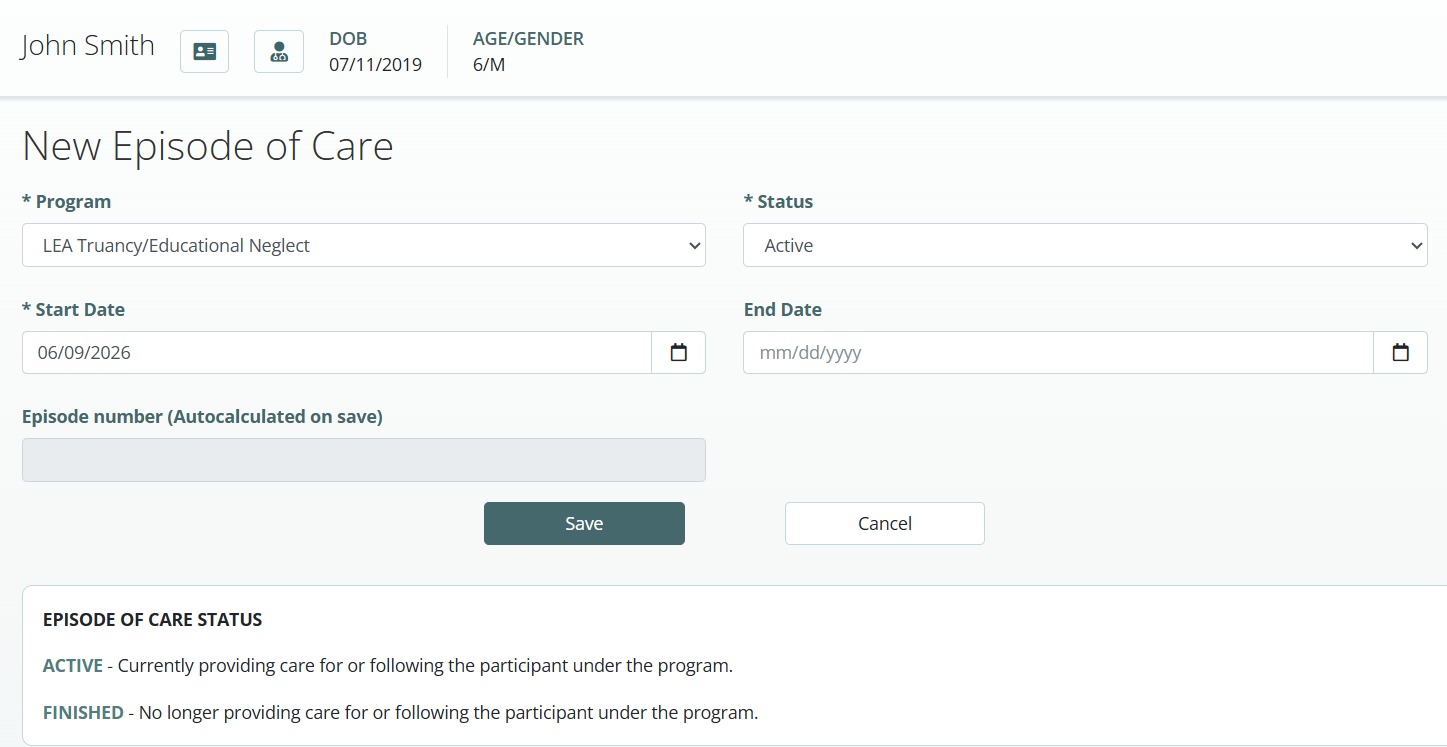
An Episode of Care tracks a student's active participation in attendance services.
Benefits
Track current attendance service involvement
Maintain historical attendance records
Support students with multiple attendance interventions over time
Monitor re-engagement efforts
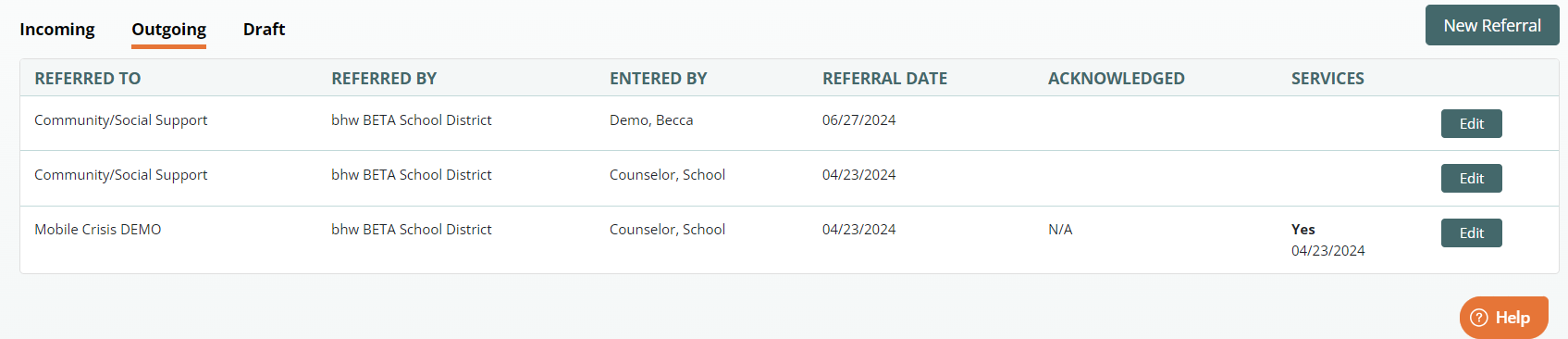
External Referral Tracking
Students may require support from outside agencies in addition to school-based attendance services.
bhworks allows staff to create and track external referrals.
Before Creating an External Referral
Obtain a signed:
Release of Information (ROI)
External Referral Features
Send referral notifications to outside agencies
Track referral status
Document multiple external referrals
Maintain referral history
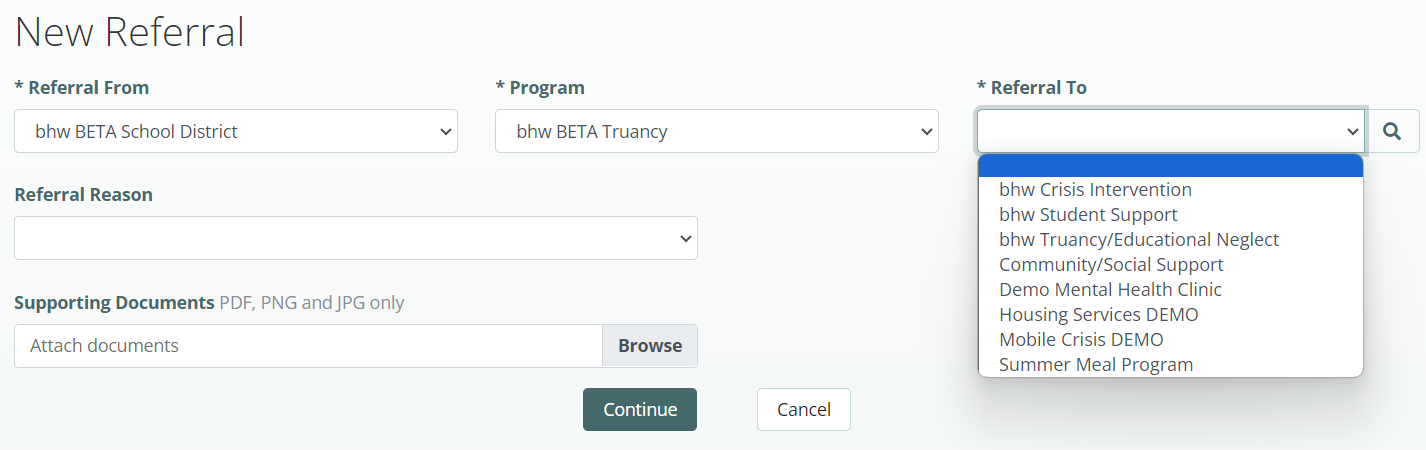
Creating an External Referral
Navigate to the Outgoing tab.
Select New Referral.
Choose the external agency.
Select the referral reason.
Submit the referral.
Reporting and Monitoring
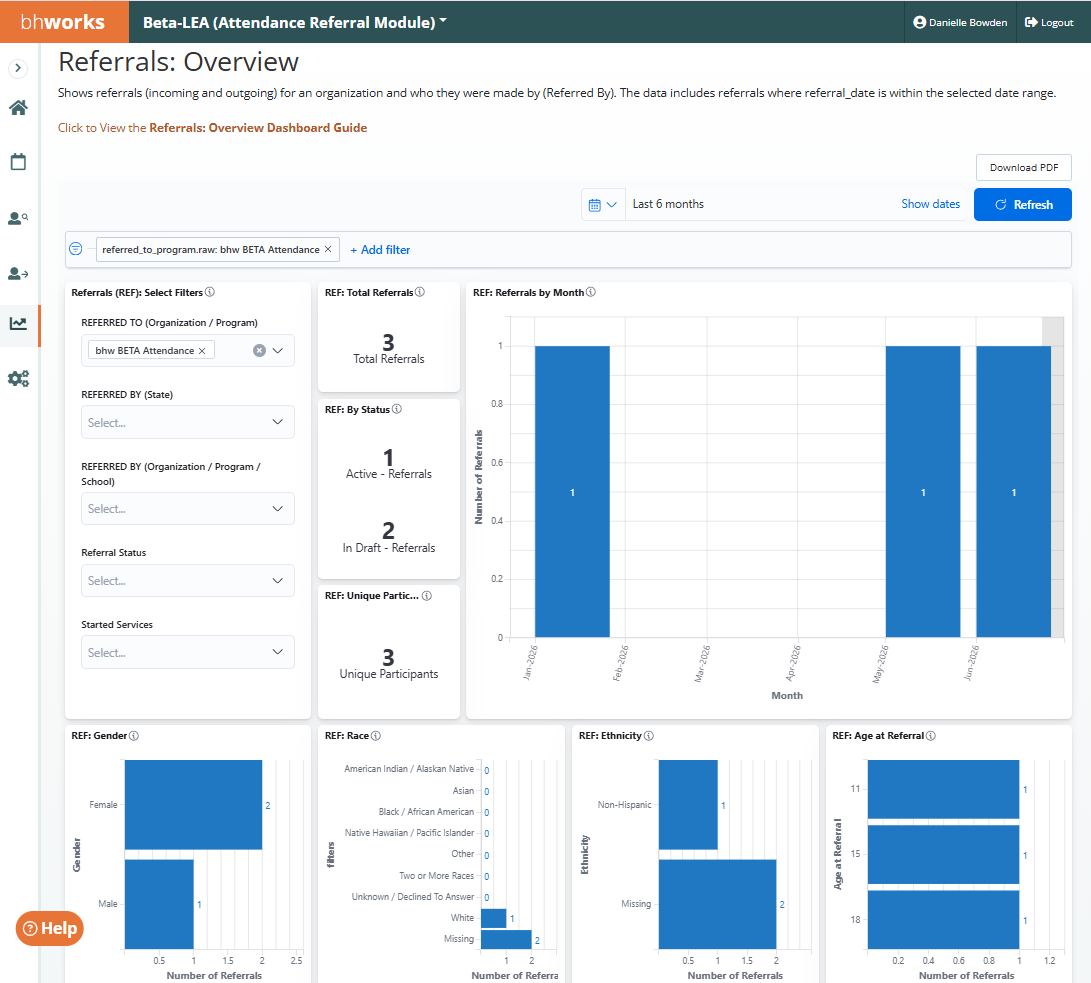
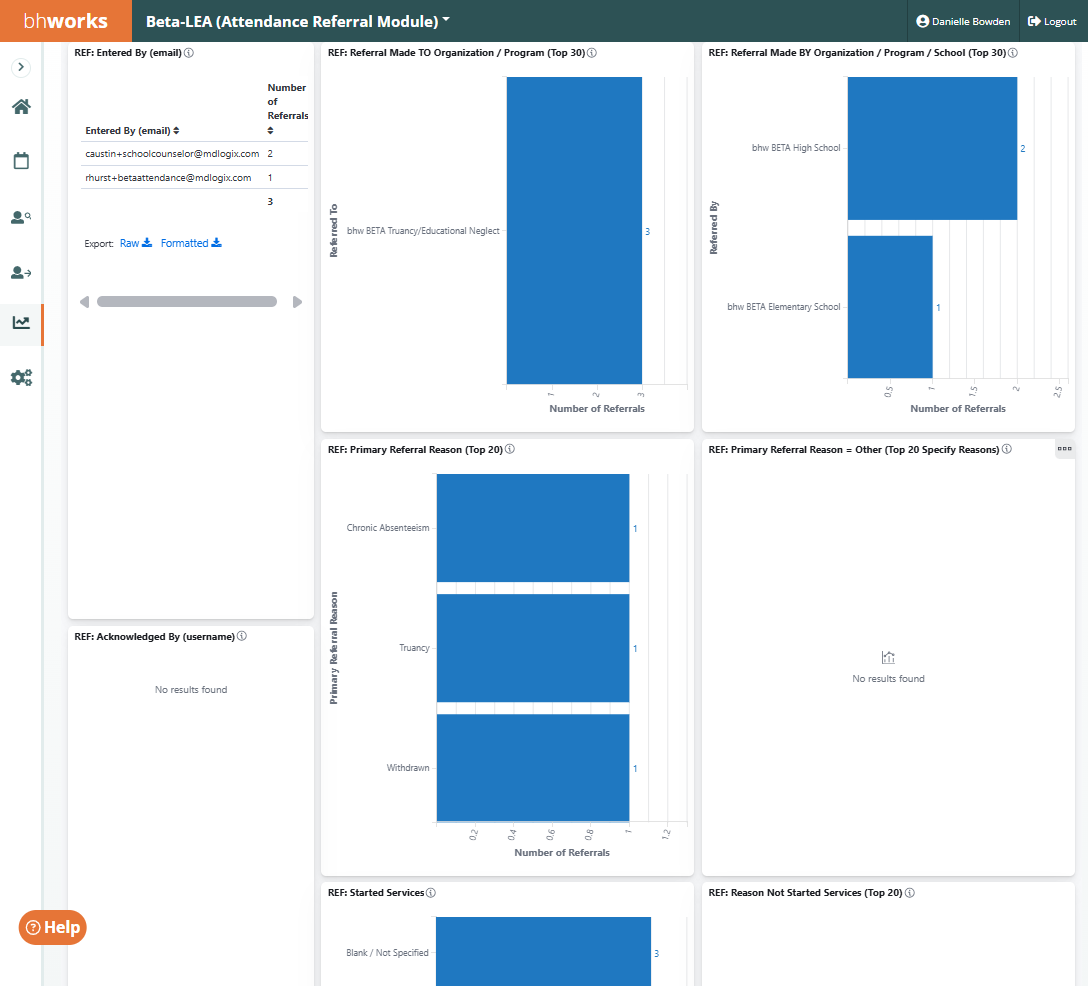
The Attendance Referral Module supports reporting at both the student and population levels.
Available Reporting Metrics
Total referrals
Referrals by school
Referral outcomes
Attendance interventions
Service utilization
Student progress tracking
Attendance program effectiveness
Customization Options
The Attendance Referral Module can be tailored to meet your organization's specific needs.
Customizable Features
Referral forms
Intake forms
Court documentation
Attendance plans
Outcome forms
Assessments and screenings
Task lists
Service categories
Reporting requirements
Next Steps
If your organization is interested in implementing the Attendance Referral Module, contact your project lead to discuss:
Implementation timeline
Configuration options
Training requirements
Pricing and licensing
The bhworks team will work with your organization to ensure the module aligns with your attendance processes and documentation requirements.
Was this article helpful?
That’s Great!
Thank you for your feedback
Sorry! We couldn't be helpful
Thank you for your feedback
Feedback sent
We appreciate your effort and will try to fix the article